Back to Engineering Vol. 3: From Cartridges to Pods

TL;DR: I’ve joined the OpenShift Bare Metal team at Red Hat. It feels a bit like coming home, back to OpenShift, and forward with Golang, into the gritty, fun world of image-based OS, provisioning, and at-scale cluster plumbing.

I started on OpenShift before it was “Kubernetes-shaped”

Twelve-plus years ago, OpenShift wasn’t the Kubernetes platform you know today. It was a Ruby-powered PaaS with cartridges for your favorite runtimes and databases. I even hosted my blog there for a while (yes, the one you’re reading now has ancestors living in little gears). You’d rhc your way to a running app and feel like a wizard. It was opinionated, developer-first, and, most importantly for me, an invitation to build.

Consulting and the OpenShift 3 years

When I joined Red Hat as a Middleware/AppDev consultant, I lived at the intersection of middleware and OpenShift CI/CD. That meant OpenShift 3: Kubernetes under the hood, templates, Jenkins pipelines, quirky edge cases, and lots of real customer problems. Consulting taught me speed, empathy, and preparation (read: build the deck before you walk into a room expecting 3 people and find 40). It also cemented my love for platforms that help teams ship better software, faster.

OpenShift 4 changed the shape of the platform

Then came OpenShift 4: image-based nodes, Operators everywhere, and a platform that leaned into being a product, not just a distribution. It felt like the moment OpenShift fully embraced its Kubernetes DNA while keeping the Red Hat polish: opinionated, secure-by-default, and boring in all the right places.

My zig-zag path inside Red Hat (and why it matters now)

I’ve worn a few hats here: consultant -> training -> engineering. On the engineering side I first joined the Kafka/Strimzi team, which I wrote about in “Back to Engineering: An engineer’s gainings through time.” Later I moved to Ansible Lightspeed, which became an adventure of its own and earned a sequel article: “Back to Engineering Vol. 2: A Path to Wisdom.” Both journeys stretched different muscles: platform building, developer tooling, content, and community, while keeping me close to the problems that real teams face every day.

So… why Bare Metal now?

Because the layers I want to understand deeply are the ones just below most people’s comfort zone:

  • RHEL CoreOS & image-based operations: reproducible nodes, transactional updates, and fewer snowflakes.
  • Go all day: my happy place, clean, fast, readable. (I wish we had Rust in the stack too:( )
  • Provisioning at scale: Assisted Installer, Metal³, and Ironic, plus ZTP workflows.
  • Owning the “boring bits”: boot flows, disk layouts, updates, where reliability is earned, not assumed.

Also, and I say this with a smile, it is a good way to heal from the traumas of the destructive disabled (by Master Ken. If you know, you know; if not, just visit: Enter The Dojo.)


Sometimes the best move is to step away from particular situations or people and carve new paths through obstacles, because, as Marcus Aurelius reminded us, “the obstacle is the way.”

What I’ll focus on (and write about)

I will continue to post about my projects around Strimzi/Kafka, Gamification, Kubernetes/Openshift Operators, and a surprise project (not a software project) is coming soon about software development, career development & coaching, and AI.

Gratitude and next steps

I’m grateful for every team and customer who shaped this path: consulting for the unpredictability that made me resilient, training for the discipline of clear, organized thinking, Kafka/Strimzi for the rigor of distributed systems, and Lightspeed for reminding me that good tools make teams braver.

Now, back to OpenShift, this time closer to the metal. If that sounds like your cup of tea, stick around. I’ll be writing about the lessons learned, the footguns avoided, and the tiny victories that add up to reliable platforms, and more will come, as I mentioned above; not only about OpenShift or bare metal.

May your pods schedule cleanly, your nodes be identical, your updates transactional, and your clusters delightfully boring.


About the cover photo – Not exactly related to my move to the Bare Metal team, but this was from a recent concert of Limp Bizkit, an old (and still performing) nu-metal band, that I had a chance to attend in Istanbul. I have ben listening this band for over 20 years and I always admired how the band guitarist, Mr. Wes Borland, loves what he does and the way he does it, by thinking always differently, always out of the box, using his creativity. I caught his guitar pick in the concert and have been keeping it on my desk to have it as an inspiration anchor for my work. Hope I can be the Wes Borland of the OpenShift Bare Metal team and my own stuff.

How to Secure Your Apache Kafka Instance with SASL-SSL Authentication and Encryption

Apache Kafka is an open-source distributed event streaming platform composed of servers and clients that communicate through the TCP protocol. LinkedIn initially created Kafka as a high-performance messaging system and open sourced it late 2010s. After many years of improvements, nowadays Apache Kafka is referred to be a distributed commit log system, or a distributed streaming platform.

Apache Kafka is a very important project in the cloud-native era, because the current distributed architecture of the services (or microservices) might require an event-based system that handles data in an event-driven way and Kafka plays an important role in this.

You can create an event-driven architecture with Kafka where all microservices communicate with events through Kafka, aggregate your logs in Kafka and leverage its durability, send your website tracking data, use it for data integration by using Kafka Connect, and more importantly you can create real-time stream processing pipelines with it.

These use-cases are very common and popular among companies nowadays, because from small startups to big enterprises, they need to keep up with the new technology era of cloud, cloud-native and real-time systems for providing better products or services to their customers. Data is one of the most important concepts for these companies and because of this, they leverage Apache Kafka capabilities by using it for many use-cases.

However, when you work with data, you must think about its security because you might be working with some financial data you might want to isolate or simply user information that you should keep private. This is both important for the sake of the company and the users or service consumers of the company. So since it is all about data, and its being secure, you should secure the parts of your system that touch the data, including your Apache Kafka.

Apache Kafka provides many ways to make its system more secure. It provides SSL encryption that you can both configure between your Apache Kafka brokers and between the server and the clients. There are also some authentication and authorization (auth/auth) capabilities that Kafka provides. Following is the compact list of auth/auth components that Apache Kafka 3.3.1 provides currently.

At the time of this writing, Kafka 3.3.1 was the latest release.

  • Authentication
    • Secure Sockets Layer (SSL)
    • Simple Authentication and Security Layer (SASL) or SASL-SSL
      • Kerberos
      • PLAIN
      • SCRAM-SHA-256/SCRAM-SHA-512
      • OAUTHBEARER
  • Authorization
    • Access Control Lists

As you can see, Kafka has a rich list of authentication options. In this article, you will learn how to setup a SSL connection to encrypt the client-server communication and setup a SASL-SSL authentication with the SCRAM-SHA-512 mechanism.

What is SSL Encryption?

SSL is a protocol that enables encrypted communication between network components. This SSL encryption prevents data to be sniffed by intercepting the network and reading the sensitive data via a Man-in-the-middle (MIM) attack or similar. Before having SSL (and Transport Layer Security (TLS)) in all the web pages on internet, internet providers used SSL for their web pages that contains sensitive data transfer such as payment pages, carts, etc.

TLS is a successor of the SSL protocol and it uses digital documents called certificates, which the communicating components use for encrypted connection validation. A certificate includes a key pair, a public key and a private key and they are used for different purposes. The public key allows a session (i.e initiating a web browser) to be communicated through TLS and HTTPS protocols. The private key, on the other hand, should be kept secure on the server side (i.e the server that the web browser is being served), and it is generally used to sign the requested documents (i.e web pages). A successful SSL communication between the client and the server is called an “SSL handshake”.

The following image shows how SSL works simply.

How SSL works

In the following tutorial, you will create a self-signed public and private key with the help of the instructions. For more information on the certificates, private and public keys, certificate authorities and many more, visit this web page as a starting point.

What is Simple Authentication and Security Layer (SASL)?

SASL is a data security framework for authentication. It acts like an adaptor inerface between authentication mechanisms and application protocols such as TLS/SSL. This makes applications or middlewares (such as Apache Kafka), easily adopt SASL authentication with different protocols.

SASL supports many mechanisms such as PLAIN, CRAM-MD5, DIGEST-MD5, SCRAM, and Kerberos via GSSAPI, OAUTHBEARER and OAUTH10A.

Apache Kafka (currently the 3.3.1 version), supports Kerberos, PLAIN, SCRAM-SHA-256/SCRAM-SHA-512, and OAUTHBEARER for SASL authentication.

The PLAIN mechanism is fairly easier to setup and it only requires a simple username and a password to setup. The SCRAM mechanism, as well, requires a username and a password setup but provides a password with challenge through its encryption logic. Thus, SCRAM provides a better security than PLAIN mechanism. The GSSAPI/Kerberos on the other hand, provides the best security along with OAUTHBEARER, however these mechanisms are relatively harder to implement.

Each of these protocols require different server and client configurations with different efforts on Apache Kafka.

Other than these mechanisms, you can enable SASL along with SSL in Kafka to gain extra security. This is called SASL-SSL protocol in a Kafka system.

In the following tutorial, you will enable SSL first, then you will enable SASL on it using the SCRAM-SHA-512 mechanism.

Prerequisites

You’ll need the following prerequisites for this tutorial:

  • A Linux environment with wget and openssl installed.
  • Java SDK 11 (be sure that the keytool command is installed)
  • The kafka-sasl-ssl-demo repository. Clone this repository to use the ready-to-use Kafka start/stop shell scripts and Kafka configurations. You will use the cloned repository as your main workspace directory throughout this tutorial.

CreditRiskCom Inc.’s Need for Kafka Security

CreditRiskCom Inc. is a credit risk analyzing company, which works with the banks and government systems. They are integrating with a government system that sends the credit risk requests to their Kafka topic to be consumed by their applications. Their applications creates the requested report and serves it to the government system usage.

Because the credit risk request data is sensitive and Apache Kafka plays a big role in the system, they want to secure it. They hire you as a Kafka consultant to help them with setting up a secure Kafka cluster with SSL and SASL.

The following diagram shows the required secure architecture for Kafka.

Secure Kafka architecture

Running the Apache Kafka Cluster

Navigate to your cloned repository’s main directory kafka-sasl-ssl-demo.

In this directory, download the Apache Kafka 3.3.1 version by using the following command.

wget https://downloads.apache.org/kafka/3.3.1/kafka_2.13-3.3.1.tgz

Extract the tgz file and rename it to kafka by using the following command.

tar -xzf kafka_2.13-3.3.1.tgz && mv kafka_2.13-3.3.1 kafka

Run the start script that is located in bin directory under kafka-sasl-ssl-demo. Note that the following script also makes the start-cluster.sh file executable.

chmod +x ./bin/start-cluster.sh && ./bin/start-cluster.sh

Preceding command runs the Zookeeper and Apacke Kafka instances that you’ve downloaded. The script uses the configurations that are located under resources/config.

Create a Kafka topic called credit-risk-request:

./kafka/bin/kafka-topics.sh \
--bootstrap-server localhost:9092 \
--create \
--topic credit-risk-request \
--replication-factor 1 --partitions 1

The output should be as follows.

Created topic credit-risk-request.

This output verifies that the Kafka cluster is working without any issues.

On a new terminal window, start the Kafka console producer and send a few sample records.

./kafka/bin/kafka-console-producer.sh \
--broker-list localhost:9093 \
--topic credit-risk-request \
--property parse.key=true \
--property key.separator=":"

On the opened input screen, enter the records one by one in the following format, which indicates the ID of the credit risk record, name and surname of the person, and risk level. Notice that you use a key parser as : to set the ID as the key.

Before sending the records, leave the producer window open and open another terminal window. Run the console consumer by using the following command.

./kafka/bin/kafka-console-consumer.sh \
--bootstrap-server localhost:9093 \
--topic credit-risk-request \
--property print.key=true \
--property key.separator=":"

Switch back to your terminal where your console producer works and enter these values:

34586:Kaiser,Soze,HIGH
87612:Walter,White,HIGH
34871:Takeshi,Kovacs,MEDIUM

The output of the console consumer on the other terminal window should be as follows.

34586:Kaiser,Soze,HIGH
87612:Walter,White,HIGH
34871:Takeshi,Kovacs,MEDIUM

Stop the console consumer and producer by pressing CTRL+C on your keyboard and keep the each terminal window open for further usage in this tutorial.

Setting Up the SSL Encryption

Regarding CreditRiskCom Inc’s request, you must secure the Kafka cluster access with SSL. To secure the Kafka cluster, you must set up the SSL encryption on the Kafka server first, then you must configure the clients.

Configuring the Kafka Server to use SSL Encryption

Navigate to the resources/config directory under kafka-sasl-ssl-demo and run the following command to create the certificate authority (CA) and its private key.

openssl req -new -newkey rsa:4096 -days 365 -x509 -subj "/CN=Kafka-Security-CA" -keyout ca-key -out ca-cert -nodes

Run the following command to set the server password to an environment variable. You will use this variable throughout this article.

export SRVPASS=serverpass

Run the keytool command to generate a JKS keystore called kafka.server.keystore.jks. For more information about keytool visit this documentation webpage.

keytool -genkey -keystore kafka.server.keystore.jks -validity 365 -storepass $SRVPASS -keypass $SRVPASS  -dname "CN=localhost" -storetype pkcs12

To sign the certificate, you should create a certificate request file to be signed by the CA.

keytool -keystore kafka.server.keystore.jks -certreq -file cert-sign-request -storepass $SRVPASS -keypass $SRVPASS

Sign the certificate request file. A file called cert-signed should be created.

openssl x509 -req -CA ca-cert -CAkey ca-key -in cert-sign-request -out cert-signed -days 365 -CAcreateserial -passin pass:$SRVPASS

Trust the CA by creating a truststore file and importing the ca-cert into it.

keytool -keystore kafka.server.truststore.jks -alias CARoot -import -file ca-cert -storepass $SRVPASS -keypass $SRVPASS -noprompt

Import the CA and the signed server certificate into the keystore.

keytool -keystore kafka.server.keystore.jks -alias CARoot -import -file ca-cert -storepass $SRVPASS -keypass $SRVPASS -noprompt &&
keytool -keystore kafka.server.keystore.jks -import -file cert-signed -storepass $SRVPASS -keypass $SRVPASS -noprompt

You can use the created keystore and truststore in your Kafka server’s configuration. Open the server.properties file with an editor of your choice and add the following configuration.

ssl.keystore.location=./resources/config/kafka.server.keystore.jks
ssl.keystore.password=serverpass
ssl.key.password=serverpass
ssl.truststore.location=./resources/config/kafka.server.truststore.jks
ssl.truststore.password=serverpass

Notice that you’ve used the same password you used for creating the store files.

Setting the preceding configuration is not enough for enabling the server to use SSL. You must define the SSL port in listeners and advertised listeners. The updated properties should be as follows:

...configuration omitted...
listeners=PLAINTEXT://localhost:9092,SSL://localhost:9093
advertised.listeners=PLAINTEXT://localhost:9092,SSL://localhost:9093
...configuration omitted...

Configuring the Client to use SSL Encryption

Run the following command to set the client password to an environment variable. You will use this variable to create a truststore for the client.

export CLIPASS=clientpass

Run the following command to create a truststore for the client by importing the CA certificate.

keytool -keystore kafka.client.truststore.jks -alias CARoot -import -file ca-cert  -storepass $CLIPASS -keypass $CLIPASS -noprompt

Create a file called client.properties in the resources/config directory with the following content.

security.protocol=SSL
ssl.truststore.location=./solutions/resources/config/kafka.client.truststore.jks
ssl.truststore.password=clientpass
ssl.endpoint.identification.algorithm=

You should set the ssl.endpoint.identification.algorithm as empty to prevent the SSL mechanism to skip the host name validation.

Verifying the SSL Encryption

To verify the SSL Encryption configuration, you must restart the Kafka server. Run the following command to restart the server.

./bin/stop-cluster.sh && ./bin/start-cluster.sh

Run the console consumer on your consumer terminal window you’ve used before.

./kafka/bin/kafka-console-consumer.sh \
--bootstrap-server localhost:9093 \
--topic credit-risk-request \
--property print.key=true \
--property key.separator=":"

You should see some errors because the consumer cannot access the server without the SSL configuration.

Add the --consumer.config flag with the value ./resources/config/client.properties, which points to the client properties you’ve set.

./kafka/bin/kafka-console-consumer.sh \
--bootstrap-server localhost:9093 \
--topic credit-risk-request \
--property print.key=true \
--property key.separator=":" \
--consumer.config ./resources/config/client.properties

You should see no errors and messages consumed but because you haven’t sent new messages to the credit-risk-request topic. Run the console producer on the producer terminal window. Use the same ./resources/config/client.properties configuration file.

./kafka/bin/kafka-console-producer.sh \
--broker-list localhost:9093 \
--topic credit-risk-request \
--property parse.key=true \
--property key.separator=":" \
--producer.config ./resources/config/client.properties

Enter the following sample credit risk record values one by one on the producer input screen:

99612:Katniss,Everdeen,LOW
37786:Gregory,House,MEDIUM

You should see the same records consumed on the consumer terminal window.

Stop the console consumer and producer by pressing CTRL+C on your keyboard and keep the each terminal window open for further usage in this tutorial.

Setting Up the SASL-SSL Authentication

Setting up the SSL is the first step of setting up a SASL_SSL authentication. To enable SASL_SSL, you must add more configuration on the server and the clients.

Configuring the Kafka Server to use SASL-SSL Authentication

Create a file called jaas.conf in the kafka/config directory with the following content.

KafkaServer {
    org.apache.kafka.common.security.scram.ScramLoginModule required
        username="kafkadmin"
        password="adminpassword";

};

In the server.properties file add the following configuration to enable SCRAM-SHA-512 authentication mechanism.

sasl.enabled.mechanisms=SCRAM-SHA-512
security.protocol=SASL_SSL
security.inter.broker.protocol=PLAINTEXT

Notice that you keep the security.inter.broker.protocol configuration value as PLAINTEXT, because the inter broker communication security is out of scope of this tutorial.

Update the listeners and advertised listeners to use the SASL_SSL.

...configuration omitted...
listeners=PLAINTEXT://localhost:9092,SASL_SSL://localhost:9093
advertised.listeners=PLAINTEXT://localhost:9092,SASL_SSL://localhost:9093
...configuration omitted...

Run the following command to set the KAFKA_OPTS environment variable to use the jaas.conf file you’ve created. Don’t forget to change the _YOUR_FULL_PATH_TO_THE_DEMO_FOLDER_ with your full path to the kafka-sasl-ssl-demo directory.

export KAFKA_OPTS=-Djava.security.auth.login.config=/_YOUR_FULL_PATH_TO_THE_DEMO_FOLDER_/kafka/config/jaas.conf

Configuring the Client to use SASL-SSL Authentication

Open the client.properties file, change the security protocol to SASL_SSL and add the following configuration.

...configuration omitted...
sasl.mechanism=SCRAM-SHA-512
sasl.jaas.config=org.apache.kafka.common.security.scram.ScramLoginModule required \
  username="kafkadmin" \
  password="adminpassword";
...configuration omitted...

Verifying the SASL-SSL Authentication

To verify the SSL Encryption configuration, you must restart the Kafka server. Run the following command to restart the server.

./bin/stop-cluster.sh && ./bin/start-cluster.sh

Run the console consumer on your consumer terminal window you’ve used before.

./kafka/bin/kafka-console-consumer.sh \
--bootstrap-server localhost:9093 \
--topic credit-risk-request \
--property print.key=true \
--property key.separator=":" \
--consumer.config ./resources/config/client.properties

Run the console producer on the producer terminal window.

./kafka/bin/kafka-console-producer.sh \
--broker-list localhost:9093 \
--topic credit-risk-request \
--property parse.key=true \
--property key.separator=":" \
--producer.config ./resources/config/client.properties

Enter the following sample credit risk record values one by one on the producer input screen:

30766:Leia,SkyWalker,LOW

You should see the same records consumed on the consumer terminal window. Optionally, you can change the username or password in the client.properties file to test the SASL_SSL mechanism with wrong credentials.

Conclusion

Congratulations! You’ve successfully implemented SASL-SSL authentication using SCRAM-SHA512 mechanism on an Apache Kafka cluster.

In this article you’ve learned what SSL, TLS and SASL are and how to setup an SSL connection to encrypt the client-server communication on Apache Kafka. You’ve learned to configure a SASL-SSL authentication with the SCRAM-SHA-512 mechanism on an Apache Kafka cluster.

You can find the resources of the solutions for this tutorial in this directory of the same repository.

Testing Cloud Native Kafka Applications with Testcontainers

Testing in application development is very important. As a developer, you cannot write code without writing tests. You can but you should not.

You can skip writing tests and use debugging to see what you application does each time you write a new code. However, this is both wrong in terms of software engineering and might make your development process less reliable and slower.

There are many discussions around on web about these topics especially on when to debug your applications or when to write tests, but there is one simple constant that you must write tests.

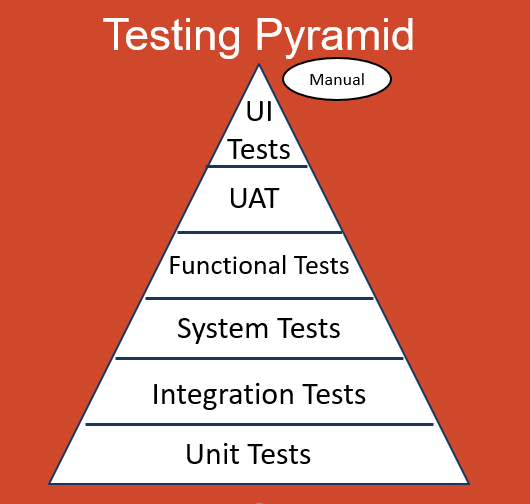
Software development tests consists of many testing strategies that covers different aspects of a software system. These testing strategies are generally represented as a pyramid, which is called testing pyramid that shows the testing types in relation to time, integration, and cost.

The testing pyramid

In an efficient software development environment, you should start writing tests with small unit tests that covers the code you are writing and makes you validate your code. These kind of tests generally are focused on the low level algorithms and functionality without being related to any integration point such as another service or a middleware such as Apache Kafka (aka. Kafka).

Developers might want to write tests that covers the integration points more but they might avoid using real systems to integrate for testing because of the time and maintenance costs. So they generally mock the integration points and focus on the logic. This ends up with many integration kind of tests written, which are actually unit tests.

Mocking is good in many ways such as you can run your tests in a faster way. However, there are drawbacks. You don’t test the real integration, so there might be unpredictable issues with a message sending to the system. Taking our previous Apache Kafka example, you might want to test your code against a real Kafka instance, or you might be developing a Kafka admin application that interacts with the Kafka configurations. If you mock Apache Kafka, you are not able to apply these tests.

At this point, Testcontainers comes as a saviour.

What is Testcontainers?

Testcontainers is a testing library, which helps developers to use Docker or Podman containers in their integration or UI/Acceptance tests.

Testcontainers makes testing easier for developers for use cases such as:

  • A data access layer that integrates with a database
  • A middleware or an application service that integrates with your application
  • UI or user acceptance tests along with libraries such as Selenium

Testcontainers supports many languages such as Java, .Net, Go, Python, Node.js, Rust, and Haskell.

In this tutorial, you will experience Testcontainers for Java along with the Kafka Containers module. You will:

  • Learn how to configure Testcontainers for Apache Kafka in a pure Java and a Spring Boot application.
  • Learn how to develop tests against Apache Kafka by using Testcontainers in a pure Java and a Spring Boot application.

Click >>this link<< to read the related tutorial from the AtomicJar Blog.

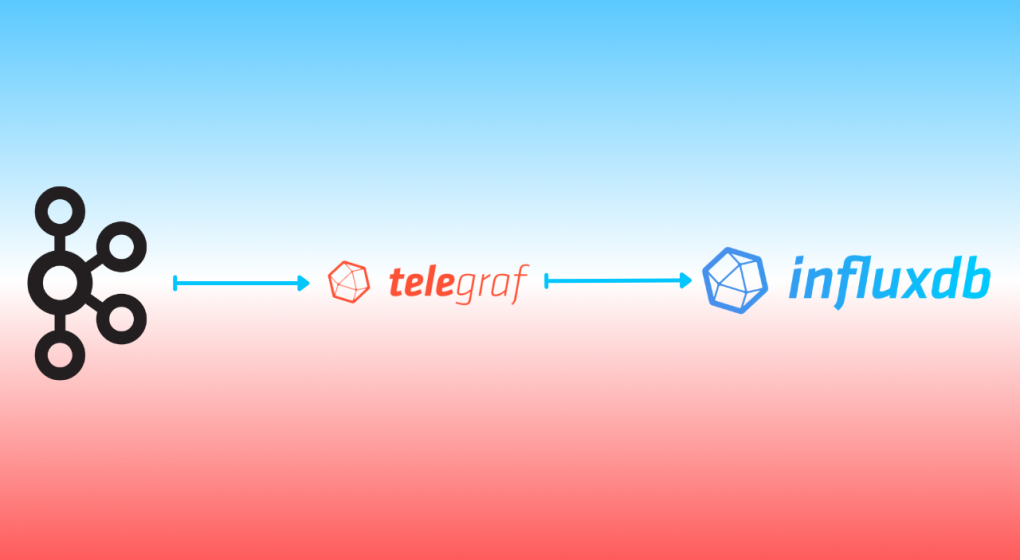
Integrating Apache Kafka with InfluxDB

We are in the cloud-native era. Applications or services count is increasing day by day as the application structures transform into microservices or serverless. The data that is generated by these applications or services keep growing and processing these data in a real-time manner becomes more important.

This processing can either be a real-time aggregation or a calculation whose output is a measurement or a metric. When it comes to metrics or measurements, they have to be monitored because in the cloud-native era, you have to be fail-fast. This means the sooner you get the right measurements or metric outputs, the sooner you can react and solve the issues or do the relevant changes in the system. This aligns with the idea that is stated in the book Accelerate: The Science of Lean Software and DevOps, which is initially created as a state of DevOps report, saying “Changes both rapidly and reliably is correlated to organizational success.

A change in a system, can be captured to be observed in many ways. The most popular one, especially in a cloud-native environment, is to use events. You might already heard about the even-driven systems, which became the de facto standard for creating loosely-coupled distributed systems. You can gather your application metrics, measurements or logs in an event-driven way (Event Sourcing, CDC, etc. ) and send them to an messaging backbone to be consumed by another resource like a database or an observability tool.

In this case, durability and performance is important and the traditional message brokers don’t have these by their nature.

Apache Kafka, on the contrary, is a durable, high-performance messaging system, which is also considered as a distributed stream processing platform. Kafka can be used for many use-cases such as messaging, data integration, log aggregation -and most importantly for this article- metrics.

When it comes to metrics, having only a message backbone or a broker is not enough. You have the real-time system but systems like Apache Kafka, even if they are durable enough to keep your data forever, are not designed to run queries for metrics or monitoring. However, systems such as InfluxDB, can do both for you.

InfluxDB is a database, but a time-series database. Leaving the detailed definition for a time-series database for later in this tutorial, a time-series database keeps the data in a time-stamped way, which is very suitable for metrics or events storage.

InfluxDB provides storage and time series data retrieval for the monitoring, application metrics, Internet of Things (IoT) sensor data and real-time analytics. It can be integrated with Apache Kafka to send or receive metric or event data for both processing and monitoring. You will read about these in more detail in the following parts of this tutorial.

In this tutorial, you will:

  • Run InfluxDB in a containerized way by using Docker.
  • Configure a bucket in InfluxDB.
  • Run an Apache Kafka cluster in Docker containers by using Strimzi container images.
  • Install Telegraf, which is a server agent for collecting and reporting metrics from many sources such as Kafka.
  • Configure Telegraf to integrate with InfluxDB by using its output plugin.
  • Configure Telegraf to integrate with Apache Kafka by using its input plugin.
  • Run Telegraf by using the configuration created.

Click >>this link<< to read the related tutorial from the InfluxDB Blog.

Back to Engineering Vol. 2: A Path to Wisdom

A Path to “Wisdom”

I have been a Java developer for about 17 years already, starting with Java 1.4 and Struts 1.2 and JSP-related stuff. I had a chance to use many other frameworks such as Spring, JSF, Spring Boot, and as a web developer, I enjoyed developing Java for web programming. This was the part before I joined Red Hat.

When I was a consultant at Red Hat, I mainly used the Java stack as the Red Hat Middleware was mainly written with Java stack, and Red Hat application runtimes consist of mainly Java-related technologies such as Spring Boot, Vert.x, and Quarkus.

My Java journey didn’t end with my moving to the Red Hat training team, where I created applications mostly again with Java. I was in the AppDev team and as I said previously, Java was one of the main languages that are used in application development on the Red Hat technologies.

It was about 9 months ago that I wanted to get serious with Java development under the “engineering” title again by moving to the Red Hat AMQ Streams/Kafka team. I truly enjoy Kafka as it has been my technical niche for years. However, as the Rolling Stones say in their song (and as it is re-stated a couple of times in the House M.D. series): “you can’t always get what you want”.

In your -engineering- career, there are times when you should take a decision on what to do next; your path.

It can be a new company or a new team. It can be a new city or a country. Moreover, it can be a new language or a new framework. Maybe you are doing a total technology stack change by choosing a new path. Sometimes it is the time to learn new things and grow your career and improve yourself.

The Wisdom Move

A month ago or so, an internal opportunity happened and I decided to move to another team within Red Hat -again as an engineer.

I am moving to the Ansible Lightspeed (formerly Wisdom) team as of August 21!

Ansible has been one of the technologies that I’ve been interested in for some time, especially when I was a Middleware Consultant at Red Hat. I remember I got a lot of help from Ansible, for automating things like installing and setting up a Kafka cluster for a few customers. Now it is time for a giveback to Ansible I guess:) Therefore, I am happy to be a part of the Ansible Lightspeed/Wisdom team.

For this move, I am switching my development stack from Java to Python (and Django).

Python has been one of the languages that I am interested in for some time. I developed the Strimzi Kafka CLI with Python and I have no regret using it as Python is one of the best languages for developing a CLI. Apart from my CLI development experience with Python, I have some Django experience. I had a chance to develop a few Django services for World Health Organization for a project called “WHO Academy” when I was working with the Red Hat Open Innovation Labs team for them. While you have a main stack and you just touch other languages, it is easy, but since this is a stack change, as Master Yoda says, I might need to unlearn some things to learn new things as I am putting something new onto my 15+ years of experience.

Answers for the Mere Mortals

This move will cause many questions in the brilliant minds of the folks who already know me for sure. Let me answer some of them upfront.


Q: Why Python? Java is a more enterprise language(!) than Python, so why choose Python?

Wrong. Python has an easy start for anyone but it is also widely used in many enterprise areas. Python is widely used in machine learning and the Ansible project itself is written with Python.

Also, being a fan of a language or technology is wrong. You can love them, but you mustn’t be a fan of them. Lately, I like Python a bit more than Java, because of a few reasons, but I am not a fan of either of them.

As a Software Crafter, a software programming language doesn’t matter to me as it is just a tool. Tools can be switched, changed, or updated over time, depending on the work and circumstances.

Q: Don’t you think that this is a career suicide?

No. For the recruiters or similar professions maybe yes, but to me it is not. Because having more than one tool in your pocket is always an advantage. Learning different things can make you gain different perspectives on things so these kinds of moves are far from being a career suicide.

Q: What about Java/Jakarta EE/Quarkus? Will you be still contributing to the communities by creating content, giving speeches, and doing workshops?

Absolutely! I will continue to write about Java and Quarkus-related stuff, create videos and workshops and speak at Java/Jakarta EE conferences.

Q: What about Apache Kafka?

I like Kafka and it’s my niche technology that I’ve been specializing in. I cannot and will not stop creating content for it. Even if I am moving from the Strimzi team, I will continue to work on my Strimzi CLI project, continue to write about it, and record videos for it. There are many articles and related video content in my queue to be created and released. So stay tuned!

Q: Any plans on writing about Ansible/Ansible Lightspeed here?

Ansible will be my second niche for sure so why not! I like the technology and its control on any system so thinking this site’s name is “System Craftsman”, that would be a pity not to include Ansible-related content here. This can be thought of as the System Craftsmanship: Software Craftsmanship in the Cloud Native Era article’s theory can come into practice from now on.

Do you have some other questions? Feel free to ask me by using the comment section below, or just wish me luck with my new journey in lightspeed:)

May the Force be with you!

Back to Engineering: An engineer’s gainings through time

EDIT: As of August 21, I am joining the Ansible Lightspeed engineering team. Stay tuned for another possible article about it!

EDIT2: Here is the new article: Back to Engineering Vol. 2: A Path to Wisdom

TL;DR: As of December 1st, I am starting a new job in Red Hat, this time as a Principal Software Engineer in the Kafka/Strimzi team. If you are curious about my Red Hat journey so far, read the rest:)

It’s been almost 5 years in Red Hat. I started my journey in Red Hat as a middleware consultant. After about 2.5 years I moved to the Red Hat Training team and have been working here as a Senior Content Architect, till now. Because it has changed recently. I am moving back to software engineering!

Before Red Hat, I was a Senior Software Engineer at Sahibinden.com, one of the highest-traffic-consuming websites in Turkey. Apart from some Business Intelligence journey or coding in .Net and PHP, most of my career consists of writing code in Java. So I called myself a “Java developer” most of the time and developed web application backends with several types of frameworks such as Struts 1.2 (yeah I am that old), JBoss Seam Framework, and Spring Framework (not Spring Boot!).

At some point, in the company I was working at, I felt that I am doing similar things in similar loops so I was in a kind of vicious cycle that I had to break. This way I wouldn’t be able to improve myself to be better in my career so I decided to learn some “new stuff” in my spare time in a scheduled way. Cloud, Kubernetes, and cloud-native were popular terms back then and I started to teach myself in very small chunks (The Kaizen Way) and tried not to break the chain.

Anyway, as a developer who was not much aware of the new cloud-native world, I learned about AWS, Kubernetes, OpenShift, and Fabric8, which was a Java library for Kubernetes.

It was early 2018, I remember reaching out to my Red Hat software engineer friend, Ali Ok, for an open position in Red Hat, asking if he can be a referral or not (Red Hat has a great job referral mechanism, which is called “Ambassador Program” and they value referrals a lot). The position was for a “Middleware/AppDev Consultant”, which requires the applicant to take care of the customer deliveries for Red Hat middleware, cloud-native apps, and most importantly: OpenShift CI/CD!

I don’t want to expand this part of the story too much but I joined a couple of interviews (including Java code interviews via Hackerrank at that time) and finally got the job and started at Red Hat as a Middleware/AppDev Consultant.

The Consultancy

I spent my ~2.5 years as a Middleware/AppDev Consultant, worked with about 20 different customers, and traveled to many countries including Senegal (West Africa), learned and taught a lot of Red Hat technologies such as Apache Camel (Fuse), Infinispan (Datagrid), Jenkins for OpenShift CI and ArgoCD for OpenShift CD, Quarkus (pretty new), and most importantly a technology that I am in love of; Apache Kafka. My Kafka journey did not start with Red Hat (as I knew a bit about Kafka from my previous job), but it became my “niche” technology in Red Hat. (For the curious ones: This presentation includes my short story with Kafka.)

Working with customers can be hard because their requests might vary, and communication and the way of working can vary depending on the people’s personalities (like everywhere) or the company culture.

As a software engineer, whose job was to just write code and almost only have to talk in the meetings, it was really hard for me initially because you could have “randomness” in that area, which makes the processes “unpredictable”.

An example of an unpredictable situation that I remember of is, once I contacted a customer to arrange a meeting and we arranged the meeting for a start of delivery (delivery here means the consultancy work/labor for the customer). There were only 3 or 4 people in the meeting request in my calendar so I was very relieved as I was not a good public speaker back then, so doing things among 3-4 people always meant it would be a small meeting in a small room. Easy start! I prepared only my hardware in relief and went to bed for the next day.

I went to the customer’s office the next morning, met the person who welcomed me to their company and we headed to the meeting room. When we came by the door of the meeting room, because of the external view I suspected that it was a big room. Well, sometimes we had small meetings in big meeting rooms, so that was something I was used to and that had to be a similar case.

He opened the door of the meeting room and there was a big long desk full of people around it (I could not count but it must be more than 40), waiting for me and my unprepared presentation as an intro for development processes with OpenShift.

Well, of course, I did not say “sorry but I didn’t prepare the presentation” or “I can’t show you anything today”, but sat down and requested about 5 minutes to be “prepared”. What do you think I did after this?

Well luckily, my dear colleague Cenk Kulacoglu, who is now the manager of the Red Hat Consultancy team in Turkey (he was a senior architect back then), had taught me to be prepared in any time. I had seen him he always had a couple of presentations in his Google Drive so that he could either present them or change them regarding the customer needs. That was what I did for that customer.

I told you about this story because being a consultant, not only makes you improve yourself technically but also improves your soft skills so that you can give more to your clients.

In consultancy, you can not only learn how to be “always being prepared” to overcome the “unpredicted situations”, but also many other skills that I think improved me in many ways:

  • Public speaking: I was shy about speaking in public probably because of a couple of traumas I had in my childhood. I had a chance to overcome this with the “unpredicted situations” many times. When you expect to see 3 people but learn that you have to present to 40, it improves you. Now I am pretty relaxed talking in front of public.
  • Presentation skills: I learned a lot from my craftership master Lemi Orhan Ergin in the past, and I think I had a chance to evolve it in my way with the style that I learned by just preparing slides. The key part is the “flow” and you learn it by doing. And if there are times that you have to do it in just 30 minutes to prepare a deck, then you learn it better:) (This is another story that I will not give any detail about.)
  • Presenting skills: A presentation is not only about slides, but you have to learn how to explain the topic to the audience, especially if they are your customers, you have to do it better because they want to learn from you and they are consulting with you. You must distill the knowledge and present it with the tools (presentation) and your public speaking abilities.
  • Persuasion/Negotiation skills: Well sometimes you have to convince the people/customer you work with. When you are a consultant, you are the one who is consulted so you might need to use your persuasion or negotiation skills from time to time.
  • Fast learning: You must learn things faster in the moving environment of consultancy because you will always be expected to know things, especially if that things belong to a wide group, such as middleware or CI/CD.
  • Flexible attitude (Politics skills): This is not about any politician or what they do but this is more about managing yourself and your clients. You must be always nice to the customers and should not be too direct. Sometimes there will be misunderstandings, or sometimes there can be really tough customers, you have to manage them all so you should not have one and only one solution for the same thing but many. This is not about a “customer is always right” thing, but about using your persuasion, negotiation, and “niceness” skills and being flexible as much as you can. This is one of the things that I learned very later on.
  • And many more that I might not remember… You can add your own in the comments section below.
WHO Built This

Just before finalizing my days as a consultant, I had a chance to work with a very special team; Red Hat Open Innovation Labs team, on a very special project; the World Health Organization (WHO) Learning Experience Platform (LXP), at a very special (and weird) time of the year; just after the pandemic happened!

It was a great experience with the WHO team, trying to implement and stabilize a real DevOps culture within their organization and creating a functioning application for their LXP project in just 8 weeks.

Enough for the words for this, for the curious mere mortals, here is how we did it:

Gaining these kinds of experiences as a “Software Engineer” or consultant makes you think differently. Being physically in a customer environment is one thing, having a kind of remote customer engagement, which is worldwide, timezone dependant, and important (because it is directly about health in a pandemic time), is another thing.

After my ~2.5 years of consultancy journey, because of having a small taste of working in a remote worldwide environment, and a bit of love for writing and creating content to teach people, I decided to move to another team, where I can access these benefits and improve myself on creating training content. I moved to the Red Hat Training (internally aka. Global Learning Services – GLS) team.

The “Content” Development

In February 2021 I joined the Red Hat training team, with the enthusiasm and excitement of having a chance to create professional content. I would write books for training and I was very excited about that.

Before being a consultant, I had been admiringly looking at the techie people who created content consistently. Some consistently wrote blog posts, others created YouTube content.

Especially the writing part took a lot of interest in me because if think if I did not become a “techie” I would be a writer; a novel writer. I remember I left similar notes to every close friend of mine in the high school diary book like “…in the future it is likely you find me in a book…”, giving the message to both their subconscious and mine. It is kind of childish but I have to admit that I liked writing because I had been writing short stories and poems at that time (poems in both English and Turkish. Edgar Allan Poe was -and still is- my favorite).

After years, in university, I lost my interest in writing and things went more with Maths and 0-1s but while trying to learn things on the web, I realized writing (actually creating content) is still a thing, which will not be rotten away. I tried to create some forums first, wrote one by myself with PHP, then used vBulettin and similar things but end up creating the site and writing a couple of posts or two then forget the website.

Later on, I understood that it is not a matter of quality, but quantity and consistency. This is another topic though, so I am leaving this for another article.

While I was working on the “Strimzi Kafka CLI”, writing blog posts about it, and creating video content, I always thought about writing better. If you are a software engineer who has this mindset that seeks a spec for everything technical, you also seek a spec for everything in the real world, like written content. I knew that my writing was not good (and still not perfect), but I probably sensed that there should be a better way to do that with a spec or something.

There are books around about creating content better such as Everybody Writes by Ann Handley and On Writing: A Memoir of the Craft by Stephen King, I bought both of them before I joined the training team and read both but it was the time I really learned about writing: writing, reviewing and get your content reviewed by your colleagues and the editors.

I learned that there is really a spec like developers have for their programming languages or frameworks. We used the Red Hat Style Guide and IBM Style Guide, which guided us a lot while we write. I think this is the actual process you really learn doing something. While I might be still chased by zombies of passive voice, I think my writing got improved a bit, good enough for helping a content creation agency with creating high-quality content for their customers. I am going to expand on this part later on in a different post about “Writing for Developers”.

Training the Experts

Working in a training team not only gives you a chance to improve your writing skills, but also you become a trainer by thinking from the trainee’s perspective.

We had a lot of discussions about how to present the content to the students, and how to write better quizzes, labs, and guided exercises, we even tried out different models of instructions so that we could get feedback about those and improve our end.

Training content is not like blog post content so you must think about its architecture (because it is actually a book), you have to have inclusive language, your style should be formal, you have to be clear with your instructions, and so on. Most importantly, because it is teamwork, you have to know how to work together and how to connect the dots of yours and other people’s because, in the end, it is a whole content that customers and Red Hat trainers use.

In the period that I’ve been involved in, I had a chance to work on many training contents including OpenShift CI/CD and OpenShift Serverless.

Here is a short list of the training courses we created during my tenure:

While I contributed writing content for these courses, I had a chance to use my connections from consultancy to reach out to people who are experts on those topics so we could get a lot of useful feedback before, during, and after the course development.

I can say that the Kafka one is my favorite one as I not only contributed to its content but also helped shape the outline of this course. It was the first course that I had a chance to start from scratch so I can admit I had a lot of fun. (Also thanks to my friends Jaime and Pablo who made this process fun for me. Long live the 3 Musketeers!)

I also had a chance to do a few Taste of Training (ToT) webinars where we demonstrated a training-relevant technology and did announcements about our present or future courses. You can find one about “Openshift Serverless” here still live on the Red Hat Webinars page, and another one about “Building event-driven systems with structure” is here on my YouTube channel:

In the training team, I had many chances to use my previous skills like presentation, people connections, fast learning, and product information, and learned new ones such as writing and training mechanics. Knowing how to write, as a developer, helped me a lot because when you write, you learn how to express your opinions better and you become more organized. Also if you start writing here and there, it is inevitable that you get some attraction which helps your self-marketing. I don’t write on popular technical content websites much but as I mentioned before, in my free time, I help a developer content creation agency where I can hone my writing or outlining skills.

It has been fun to work as a Content Architect at Red Hat but after some time I felt like I should focus on a single technology and work on it in a lower-level manner. Since I have been very much interested in Kafka and Strimzi for some time, I took a chance to move to the Red Hat Kafka engineering team, and luckily I was able to become a part of that team, which consists of very smart, talented and friendly people that I already know of!

The New Journey: Red Hat Kafka Engineering

As I mentioned at the very beginning of the article, it has been quite a time since I haven’t been doing R&D and writing low-ish-level code. I mean I wrote a lot of code for customer projects when I was a consultant, I wrote code for the guided exercises and labs for the training team, and wrote code for my open-source pet projects but writing the code for the product itself is a different thing. It is something that I haven’t been “directly” doing for 4+ years so I have to admit that I am a bit nervous and excited about it.

However, hopefully, I will have a chance to use my gainings from other teams and past experiences from them, and waking up the “software engineer” inside me with those past gainings, I believe, will create a beneficial combination for the team.

I am a lot excited that I will have a chance to do direct contributions to the Strimzi and AMQ Streams. I know that it is not like contributing from the outside because when you become a member, expectations become higher:)

I am starting my Principal Sofware Engineer role in the Kafka/Strimzi engineering team as of December 1st, so wish me luck with my new journey in Red Hat:)

Change Data Capture with CockroachDB and Strimzi

Dealing with data is hard in the Cloud-native era, as the cloud itself has many dynamics, and microservices have their unique data-relevant problems. As many patterns emerge after dealing with similar problems over and over, technologists invented many data integration patterns to solve those data-related problems.

Change Data Capture (CDC) is one of those data integration patterns, maybe one of the most popular ones nowadays. It enables capturing row-level changes into a configurable sink for downstream processing such as reporting, caching, full-text indexing, or most importantly helping with avoiding dual writes.

Many technologies implement CDC as either a part of their product’s solution or the main functionality of an open-source project like Debezium.

CockroachDB is one of those technologies that implement CDC as a part of their product features.

CockroachDB is a distributed database that supports standard SQL. It is designed to survive software and hardware failures, from server restarts to data center outages.

While CockroachDB is designed to be excellent, it needs to coexist with other systems like full-text search engines, analytics engines or data pipeline systems. Because of that, it has Changefeeds, which enable data sinks like AWS S3, webhooks and most importantly Apache Kafka or Strimzi: a Kafka on Kubernetes solution.

Strimzi is a CNCF sandbox project, which provides an easy way to run and manage an Apache Kafka cluster on Kubernetes or OpenShift. Strimzi is a Kubernetes Operator, and it provides an easy and flexible configuration of a Kafka cluster, empowered by the capabilities of Kubernetes/OpenShift.

In this tutorial, you will:

  • Run a Kafka cluster on OpenShift/Kubernetes.
  • Create a topic within Strimzi by using its the Strimzi CLI.
  • Create a CockroachDB cluster on OpenShift and use its SQL client.
  • Create a table on CockroachDB and configure it for using CDC.
  • Create, update, delete records in the CockroachDB table.
  • Consume the change events from the relevant Strimzi topic by using the Strimzi CLI.

Prerequisites

You’ll need the following for this tutorial:

  • oc CLI.
  • Strimzi CLI.
  • A 30-days trial license for CockroachDB, which is required to use CockroachDB’s CDC feature.
  • You must have Strimzi 0.26.1 or AMQ Streams 2.1.0 operator installed on your OpenShift/Kubernetes cluster.
  • You must have CockroachDB 2.3.0 operator installed on your OpenShift/Kubernetes cluster.

CockroachBank’s Request

Suppose that you are a consultant who works with a customer, CockroachBank LLC.

They use CockroachDB on OpenShift and their daily bank account transactions are kept in CockroachDB. Currently, they have a mechanism for indexing the bank account transaction changes in Elasticsearch but they noticed that it creates data inconsistencies between the actual data and the indexed log data that is in Elasticsearch.

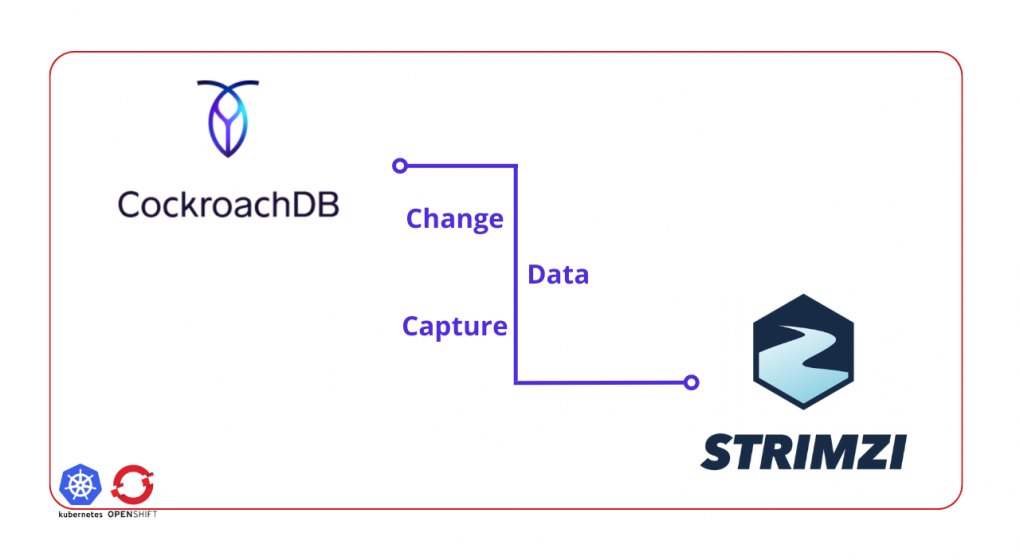
They want you to create a core mechanism that avoids any data inconsistency issue between systems. They require you to create a basic implementation of a CDC by using CockroachDB’s Changefeed mechanism and because they use CockroachDB on OpenShift, they would like you to use Strimzi.

You must only implement the CDC part, so do not need to implement the Elasticsearch part. To simulate the CockroachBank system, you must install the AMQ Streams and CockroachDB operators on your OpenShift cluster and create their instances.

The following image is the architectural diagram of the system they require you to implement:

Required Architecture

Creating a Strimzi Cluster

To create a Strimzi cluster, you need a namespace/project created on your OpenShift/Kubernetes cluster. You can use the oc CLI to create a namespace/project.

oc new-project cockroachbank

Run the kfk command of Strimzi CLI to create a Kafka cluster with one broker. A small cluster with one broker is enough for a demo.

export STRIMZI_KAFKA_CLI_STRIMZI_VERSION=0.26.1 && \
kfk clusters --create \
--cluster my-cluster \
--replicas 1 \
--zk-replicas 1 \
-n cockroachbank -y

NOTE

You can download the Strimzi CLI Cheat Sheet from here for more information about the CLI commands.


Verify that you have all the Strimzi pods up and running in Ready state.

oc get pods -n cockroachbank

The output should be as follows:

NAME                                          READY   STATUS    ...
...output omitted...
my-cluster-entity-operator-64b8dcf7f6-cmjz8   3/3     Running   ...
my-cluster-kafka-0                            1/1     Running   ...
my-cluster-zookeeper-0                        1/1     Running   ...
...output omitted...

Running CockroachDB on OpenShift

To install CockroachDB on your OpenShift cluster, download the CockroachDB cluster custom resource, which the CockroachDB operator creates the cluster for you by using the resource definition you provide in the YAML.

The YAML content should be as follows:

kind: CrdbCluster
apiVersion: crdb.cockroachlabs.com/v1alpha1
metadata:
  name: crdb-tls-example
  namespace: cockroachbank
spec:
  cockroachDBVersion: v21.1.10
  dataStore:
    pvc:
      spec:
        accessModes:
          - ReadWriteOnce
        resources:
          requests:
            storage: 10Gi
        volumeMode: Filesystem
  nodes: 3
  tlsEnabled: false

Run the following command to apply the resource YAML on OpenShift.

oc create -f crdb-cluster.yaml -n cockroachbank

Verify that you have all the CockroachDB pods up and running in Ready state.

oc get pods -n cockroachbank

The output should be as follows:

NAME                                          READY   STATUS    ...
...output omitted...
crdb-tls-example-0                            1/1     Running   ...
crdb-tls-example-1                            1/1     Running   ...
crdb-tls-example-2                            1/1     Running   ...
...output omitted...

In another terminal run the following command to access CockroachDB SQL client interface:

oc rsh -n cockroachbank crdb-tls-example-0 cockroach sql --insecure

On the SQL client interface, run the following commands to enable the trial for enterprise usage. You must do this because CDC is a part of the Enterprise Changefeeds and you need an enterprise license. Refer to the Prerequisites part of this tutorial if you did not get a trial license yet.

SET CLUSTER SETTING cluster.organization = '_YOUR_ORGANIZATION_';
SET CLUSTER SETTING enterprise.license = '_YOUR_LICENSE_';

Creating and Configuring a CockroachDB Table

On the SQL query client terminal window, run the following command to create a database called bank on CockroachDB.

root@:26257/defaultdb> CREATE DATABASE bank;

Select the bank database to use for the rest of the actions in the query window.

root@:26257/defaultdb> USE bank;

Create a table called account with the id and balance fields.

root@:26257/bank> CREATE TABLE account (id INT PRIMARY KEY, balance INT);

Create a Changefeed for the table account. Set the Strimzi Kafka cluster broker address for the Changefeed, to specify the broker to send the captured change data:

root@:26257/bank> CREATE CHANGEFEED FOR TABLE account INTO 'kafka://my-cluster-kafka-bootstrap:9092' WITH UPDATED;

Notice that the Kafka bootstrap address is my-cluster-kafka-bootstrap:9092. This is the service URL that Strimzi provides for the Kafka cluster my-cluster you have created.


NOTE

For more information on creating a Changefeed on CockroachDB refer to this documentation page.


Leave the terminal window open for further instructions.

Creating a Strimzi Topic and Consuming Data

In another terminal window run the following command to create a topic called account:

kfk topics --create --topic account \
--partitions 1 --replication-factor 1 \
-c my-cluster -n cockroachbank

The output must be as follows:

kafkatopic.kafka.strimzi.io/account created

IMPORTANT

A topic with 1 partition and 1 replication factor is enough for this demonstration. If you have a Strimzi Kafka cluster with more than 1 broker, then you can configure your topic differently.


Notice that it is the same name as the CockroachDB table account. CockroachDB CDC produces change data into a topic with the same name as the table by default.

In the same terminal window run the following command to start consuming from the account topic:

kfk console-consumer --topic account \
-c my-cluster -n cockroachbank

Leave the terminal window open to see the consumed messages for the further steps.

Capturing the Change Event Data

In the SQL client terminal window, run the following command to insert a sample account data into the account table.

root@:26257/bank> INSERT INTO account (id, balance) VALUES (1, 1000), (2, 250), (3, 700);

This should create the following accounts in the CockroachDB account table:

id balance
1 1000
2 250
3 700

After inserting the data, verify that the Strimzi CLI consumer prints out the consumed data:

{"after": {"balance": 1000, "id": 1}, "updated": "1655075852039229718.0000000000"}
{"after": {"balance": 250, "id": 2}, "updated": "1655075852039229718.0000000000"}
{"after": {"balance": 700, "id": 3}, "updated": "1655075852039229718.0000000000"}

To observe some more event changes on the topic data, run the following queries on the SQL client to change the balance between accounts.

root@:26257/bank> UPDATE account SET balance=700 WHERE id=1;
root@:26257/bank> UPDATE account SET balance=600 WHERE id=2;
root@:26257/bank> UPDATE account SET balance=650 WHERE id=3;

Verify that the new changes, which CDC of CockroachDB captures, are printed out by the Strimzi CLI consumer. In the consumer’s terminal window, you should see a result as follows:

...output omitted...
{"after": {"balance": 700, "id": 1}, "updated": "1655075898837400914.0000000000"}
{"after": {"balance": 600, "id": 2}, "updated": "1655075904775509980.0000000000"}
{"after": {"balance": 650, "id": 3}, "updated": "1655075910511670876.0000000000"}

Notice the balance changes that represent a transaction history in the consumer output.

As the last step, delete the bank account to see how CockroachDB CDC captures them. Run the following SQL query in the query console of CockroachDB:

root@:26257/bank> DELETE FROM account where id <> 0;

The Strimzi CLI consumer should print the following captured events:

...output omitted...
{"after": null, "updated": "1655075949177132715.0000000000"}

Notice that the after field becomes null when the change data is a delete event.

Congratulations! You’ve successfully captured the bank account transaction changes, and streamed them as change events via Strimzi.

Conclusion

In this tutorial, you have learned how to run a Kafka cluster on OpenShift by using Strimzi, and how to create a topic by using the Strimzi CLI. Also, you have learned to install CockroachDB on OpenShift, create a table by using its SQL query interface, and configure it for using CDC. You’ve created change events on a CockroachDB table and consumed those events from the Strimzi Kafka topic by using the Strimzi CLI.

You can find the resources for this tutorial in this repository.

Strimzi Kafka CLI Version Update (Strimzi 0.26.1 – 0.28.0)

Hi everyone. I recently updated the Strimzi Kafka CLI to the following Strimzi versions:

  • Strimzi 0.26.1 (for AMQ Streams 2.0.1) – 0.1.0a60
  • Strimzi 0.28.0 (latest) – 0.1.0a61

Note that 0.1.0a61 is the latest version and Strimzi CLI is still in alpha state.

If you are using AMQ Streams 2.0.1, then install Strimzi CLI as follows:

pip install strimzi-kafka-cli==0.1.0a60

If you are using Strimzi 0.28.0 (currently the latest);

By using pip:

pip install strimzi-kafka-cli

By using homebrew:

brew tap systemcraftsman/strimzi-kafka-cli && brew install strimzi-kafka-cli

Or you can upgrade to the latest version, which is currently 0.1.0a61;

By using pip:

pip install strimzi-kafka-cli --upgrade

By using homebrew:

brew upgrade strimzi-kafka-cli

Any updates on Strimzi Kafka CLI will be done on the latest version so the version 0.1.0a60 that is for Strimzi 0.26.1 will not be affected by these changes. There is no LTS support for now for any AMQ Streams version because the CLI is in the alpha state yet.

If you want to use a recent version of the CLI for AMQ Streams 2.0.1 (Strimzi 0.26.1), set the following environment variable to use Strimzi 0.26.1. The current latest version is compatible with Strimzi 0.26.1 as soon as you set the following environment variable.

export STRIMZI_KAFKA_CLI_STRIMZI_VERSION=0.26.1

Stay tuned for future releases. See the current workflow here and contribute if you are interested!

New to Strimzi CLI? Check out this cheat sheet:

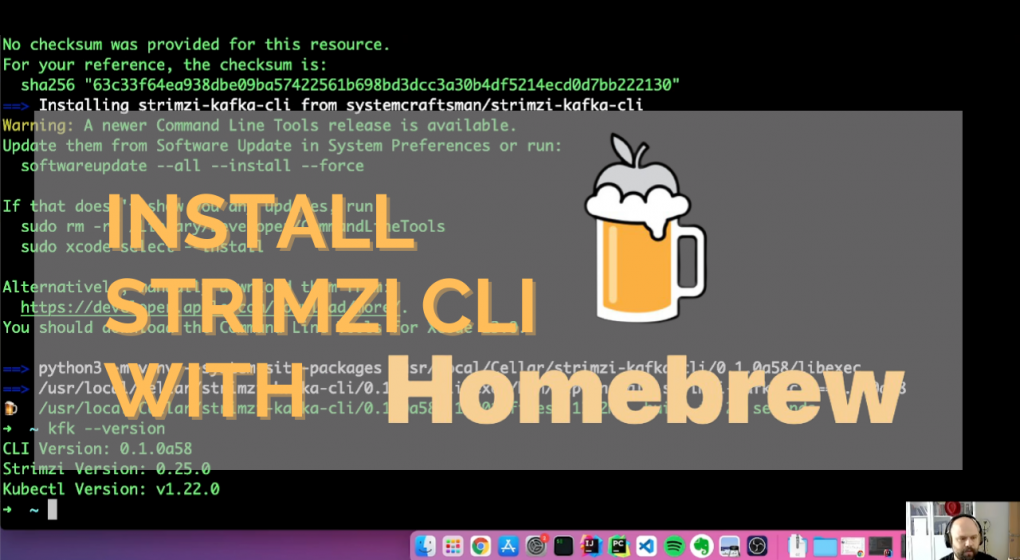
Installing Strimzi CLI with Homebrew

It has been a while since a friend of mine asked if Strimzi CLI can be installed with Homebrew.

I had to answer by saying “No” that time. But now my friend, we have the Homebrew installer:)

I had been thinking that using the Python package installer is enough because any OS can have Python and pip and so the CLI. After some time, I changed my mind since these package managers are just tools that people might be a bit fanatic of.

So why not start to support other package managers? Asking this question to myself, I decided to start with Homebrew because macOS (and Mac itself) is pretty popular among developers.

To install Strimzi CLI with Homebrew, first, you need to add the `tap` of the package:

brew tap systemcraftsman/strimzi-kafka-cli

Then you can run the `brew install` command for Strimzi CLI:

brew install strimzi-kafka-cli

The installer will check whether you have Python 3 on your machine or not and install it if it does not exist.

Here is a short video that I demonstrate how to install Strimzi CLI with Homebrew.

More curious about Strimzi CLI? Check out the Strimzi Kafka CLI Cheat Sheet to explore Strimzi Kafka CLI capabilities at a glance!

1 2 3
Page 1 of 3